 MAKIN
Customer portal development for orders, invoices and tickets
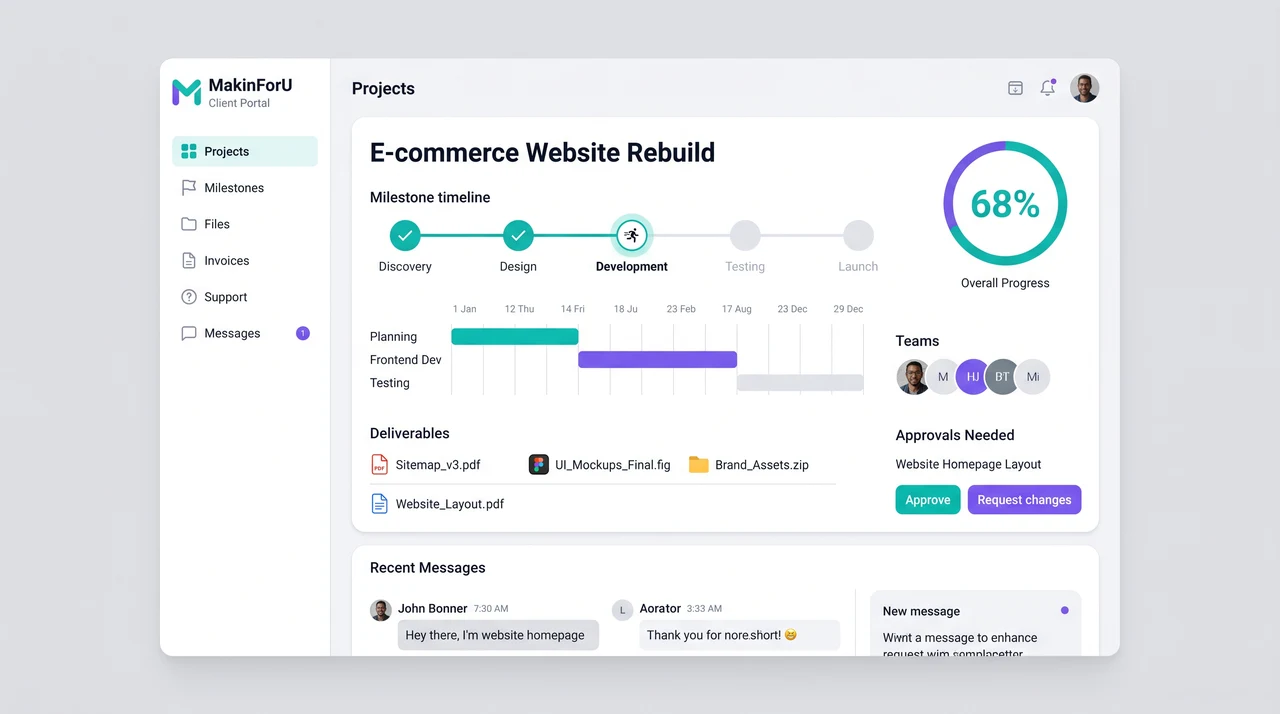
What’s included
01- ✓Order and shipment tracking
- ✓Invoice and payment history
- ✓Ticket raising with SLA view
- ✓Document and certificate downloads
- ✓Role-based access for teams
- ✓ERP or CRM data sync
The details
02Which calls does a customer portal replace?
The routine ones: where is my order, when will it ship, can you resend the invoice, what have we paid, where is the certificate for that batch. Each is a question your customer could answer themselves if they could see what your system already holds, and each takes someone on your team away from other work.
The package is often built for manufacturers, logistics companies and e-commerce businesses, where customers tend to ask about the same few things. The portal puts orders, shipments, invoices, tickets and documents behind one login, so the answer is there before the call is made.
Does it replace your ERP or CRM?
No. ERP or CRM data sync is part of the package: the portal reads orders, shipments, invoices and payments from the system you already run, so there is one record and your team keeps working where it works today. Which system that is, and which data flows in which direction, is agreed on the scope call before anything is built.
If you have no ERP or CRM yet, that usually comes first, because a portal can only show what a system of record holds. The CRM and ERP packages on the pricing page each carry a published starting price, and the scope call is the place to decide the order.
Who at your customer’s company sees what?
Role-based access for teams means one customer account can have several users with different rights. A buyer tracks orders and shipments, the accounts team sees invoices and payment history, a quality manager downloads certificates, and none of them sees another customer’s data.
Tickets give both sides one view. A customer raises a ticket in the portal and sees where it stands against the service level you set, instead of chasing it by phone; your team works on the same ticket, so the conversation keeps one history.
What is the portal not for?
Paying invoices online is not in the listed items; the portal shows invoice and payment history, and online payment would be scoped on the call. Neither is a mobile app: the portal is a web application built on Next.js and Node.
It is also not an internal tool for your own staff. For replacing spreadsheets inside your operations, Internal Tools & Portals starts at ₹45,000. If your customers mostly ask on WhatsApp, WhatsApp & Support Automation, from ₹12,000, answers order and status questions inside the chat.
How it works
03- 0115-min callTell us what’s breaking. We ask the questions that change the price.
- 02Scope in writingA fixed quote and a written scope: what’s in, what isn’t.
- 03Build & reviewWorking software early, with review rounds on real screens.
- 04LaunchWe go live with you, train your team and hand over access.
- 05SupportFixes, changes and growth on a retainer, if you want one.
FAQ
04How much does a customer portal cost?
Our Customer Self-Service Portal starts at ₹25,000 and is delivered within 30 days, covering order and shipment tracking, invoice and payment history, tickets with an SLA view, document downloads, role-based access and ERP or CRM data sync. Your fixed price arrives in writing after a 15-minute scope call.
Should we build a portal or a WhatsApp bot?
They answer different needs. A WhatsApp bot suits quick status questions asked in a chat; the WhatsApp & Support Automation package starts at ₹12,000. A portal suits customers who need records, such as invoices, payment history, certificates and ticket history, and several people on their side who each need access.
What does the SLA view on tickets show?
Each ticket shows its status against the service level you set for that kind of request, so your customer can see whether it is on time without phoning. The service levels are yours to define; the portal makes them visible to both sides.
Our invoices are in Tally. Can the portal use them?
The package lists ERP or CRM data sync, so a Tally connection is scoped on the call. TallyPrime exposes its data through an XML interface, and if invoices and payments sit there, the Tally Integration & Automation package, from ₹12,000, sets up the TallyPrime XML / ODBC connector with ledger and item master mapping.
How do we check the portal shows the right data?
During the build. There is a working demo on day one, and for a portal that means logging in as a test customer and comparing orders, invoices and documents with what your ERP or CRM holds. The whole build takes up to 30 days, and if week one isn’t right, you don’t pay for it.
More in Websites
05Also see
0615 minutes.
One quote.
Tell us what you need. We reply on WhatsApp or email with a time, and a written quote after the call.
Re: Customer Self-Service Portal