 MAKIN
CA practice management software for clients, tasks and due dates
What’s included
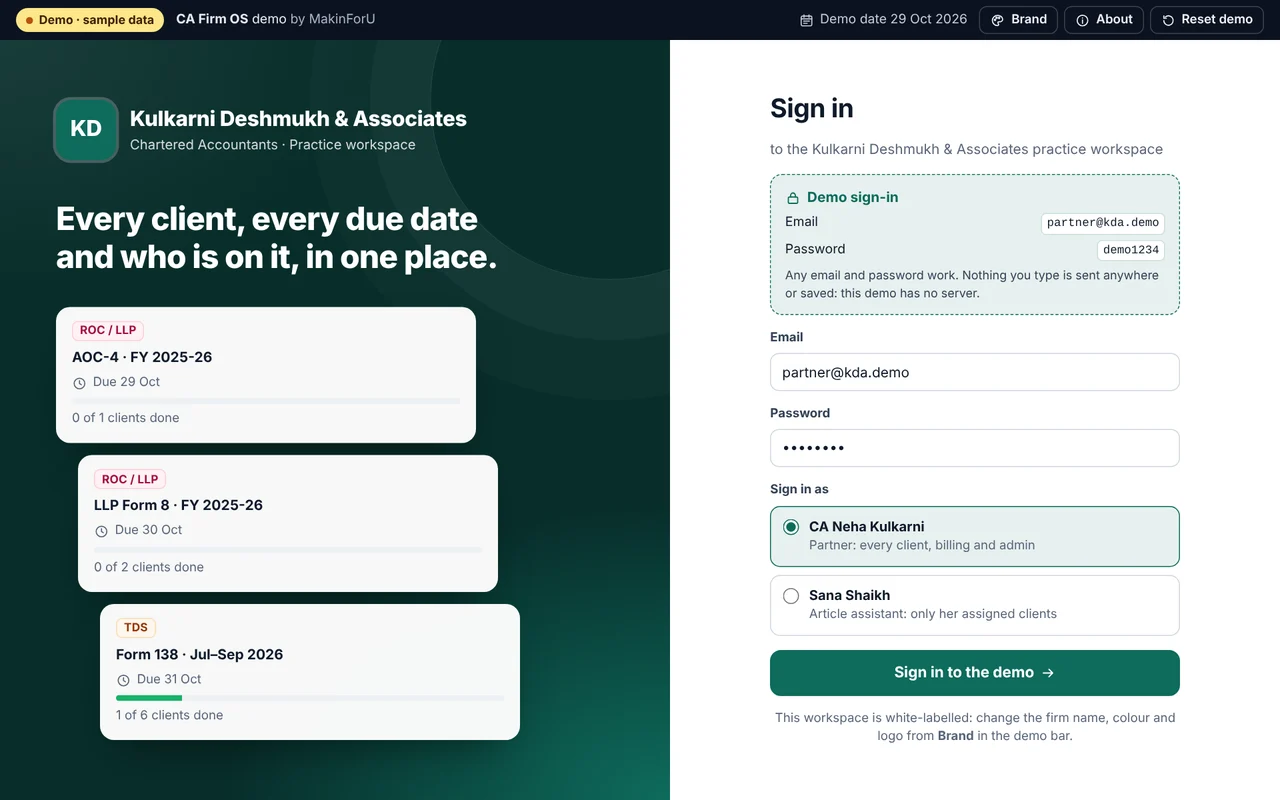
01- ✓Client management, task tracking, compliance calendars, invoicing and document workflows in one place.
- ✓Client work included
- ✓Compliance calendar included
- ✓Your brand, your domain
- ✓Payments, GST invoices and WhatsApp updates
The details
02What changes inside the firm?
A CA practice runs on recurring deadlines — GST returns, TDS, ROC filings — spread across many clients and several staff. CA Firm OS puts the client list, the tasks under each client and the compliance calendar in one system, so a partner can see what is due, who is working on it and what is finished without asking round the office.
Invoicing sits in the same system as the client work, with Razorpay or Stripe for collection and GST invoice templates. Document workflows keep what clients send, and what the firm sends back, moving through one place instead of across personal inboxes and shared folders.
Does CA Firm OS file returns?
No. Filing is not in its description. CA Firm OS tracks the work around each filing; the return itself is still prepared and filed the way your team does it today. It is not accounting software either — clients’ books stay in Tally or wherever they are kept now.
Two packages sit next to it for the businesses you serve. GST & E-Invoice Automation (from ₹30,000) generates e-invoices and e-way bills and prepares GSTR-1 and 3B data from a business’s own records. Tally Integration & Automation (from ₹12,000) posts sales, purchase and receipt vouchers into TallyPrime from other systems, so nobody re-types them.
Where does the firm’s data live, and how does it get in?
For a firm, the practical question is where client data lives. CA Firm OS is deployed on your infrastructure or ours; buying it, for ₹89,000, gives you the source code and a perpetual, non-exclusive licence to run it, so it can run entirely on servers you control. Renting, at ₹14,999 a month, suits a firm that prefers a monthly licence to a one-time purchase.
Your existing client list, due dates and open work have to come across from somewhere — spreadsheets, an older tool, a register. Moving that data is not listed among the product’s inclusions, so tell us on the scope call what you have and in what form; if it needs importing, that is priced in writing before you commit.
When is a custom CRM the better choice?
CA Firm OS is a product: you start from the way it already organises clients, tasks and deadlines, and change it through the Customise model where needed. A firm with its own structure — several offices, its own approval rules, fields that match its engagement types — may be better served by Custom CRM Setup, from ₹95,000 and up to 3 months, which includes custom objects, role and territory permissions, approval rules and migration from existing tools.
How it works
03- 0115-min callTell us what’s breaking. We ask the questions that change the price.
- 02Scope in writingA fixed quote and a written scope: what’s in, what isn’t.
- 03Build & reviewWorking software early, with review rounds on real screens.
- 04LaunchWe go live with you, train your team and hand over access.
- 05SupportFixes, changes and growth on a retainer, if you want one.
FAQ
04What does CA Firm OS cost?
CA Firm OS is ₹89,000 as a one-time purchase, which includes the full source code, or ₹14,999 a month on rent. Additions made for your firm, such as WhatsApp reminders, are quoted separately, and bringing in your existing client records is scoped on the call. Your fixed price arrives in writing after a 15-minute scope call.
Can I try CA Firm OS before I pay?
Yes. The live demo linked at the top of this page runs in your browser on made-up sample data, so you can click through CA Firm OS before the scope call; nothing you enter in it is sent anywhere. On the call we go through what your version needs on top and which model fits, and the fixed price follows in writing.
Does the compliance calendar cover GST, TDS and ROC work?
Tracking recurring deadlines such as GST, TDS and ROC filings is what the compliance calendar is for. How your clients, the returns each one files and the staff responsible map onto it is confirmed on the scope call, so the set-up matches the way your firm already allocates work.
Can clients get deadline reminders on WhatsApp?
WhatsApp reminders are not part of CA Firm OS as described on the site; they can be built on through the Customise model. Separately, WhatsApp & Support Automation (from ₹12,000) sets up the WhatsApp Business API with template broadcasts and a hand-off to your staff; whether it should draw on the firm’s calendar is scoped on the call. Meta bills its per-message fees separately.
Who can see client files?
Users are managed from the admin panel, and the system can be deployed on your own infrastructure. The access rules your firm needs — which staff see which clients’ documents — are confirmed on the scope call and written into the proposal before anything is set up.
How long before the firm is using it?
CA Firm OS launches in 7 days: you pick the model, it is branded with your firm’s name, deployed and tested, and handed over with a written guide and a live training session for your team. Three months of support follow the launch.
More products
0515 minutes.
One quote.
Tell us what you need. We reply on WhatsApp or email with a time, and a written quote after the call.
Re: CA Firm OS